Hosting Migration and SEO: Why Rankings Fluctuate After a Website Move
Switching a website from one hosting service to another is usually viewed as an improvement. Improved speed, increased uptime, enhanced security, reduced cost, greater scalability – everything looks good until the number of visitors plummets and search rankings become unstable.
This is one of the most common fears businesses face during a hosting migration.
A website that ranked consistently for months may suddenly lose positions on Google after the move. Some pages disappear temporarily from search results. Organic traffic slows down. Leads reduce. Panic starts.
The good thing about migration is that it will never necessarily lead to a collapse of the SEO. Most often than not, the reason why there are rankings shifts is that the search engines require time to digest these changes.
Understanding why these fluctuations happen can help you recover faster and avoid long-term SEO damage.
What Is Hosting Migration?
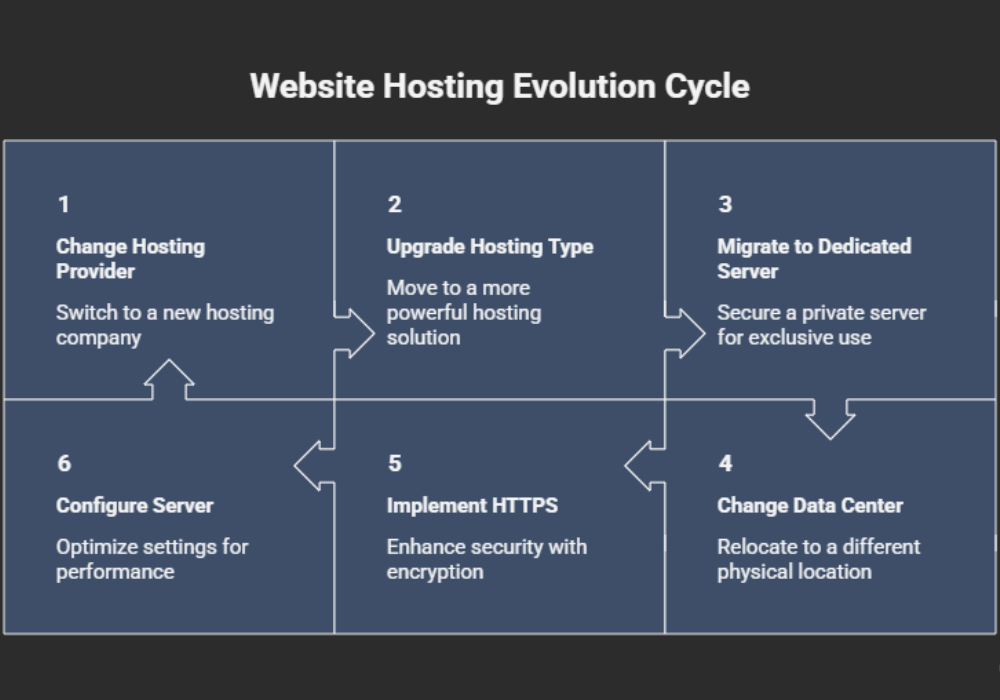
Hosting migration means moving your website from one hosting environment to another. This may include:
- Changing hosting providers
- Moving from shared hosting to VPS or cloud hosting
- Migrating to a dedicated server
- Switching data center locations
- Moving from HTTP to HTTPS alongside hosting changes
- Changing server configurations
For users, the website may look exactly the same after migration. But from Google’s perspective, several backend factors can change during the process.
Even small technical disruptions can temporarily affect crawling, indexing, and rankings.
Why SEO Rankings Fluctuate After Hosting Migration
Search engines rely on stability. When your hosting environment changes, Googlebot starts reassessing how your website behaves.
Here are the main reasons rankings fluctuate after a website move.
1. DNS Propagation Delays
One of the biggest reasons for temporary SEO fluctuations is DNS propagation.
Whenever you change your hosting, the DNS settings of the domain need to be updated across the globe. This results in users reaching the old server or the new server during that time.
This inconsistency can create issues like:
- Temporary downtime
- Mixed website versions
- Incomplete page loading
- Crawl confusion
DNS propagation usually takes a few hours but can sometimes take up to 48 hours.
During this time, Google may temporarily struggle to access your website consistently.
2. Temporary Downtime During Migration
Even short periods of downtime can affect SEO performance.
If Googlebot visits your site while it is unavailable and receives server errors like:
- 500 Internal Server Error
- 502 Bad Gateway
- 503 Service Unavailable
Google may temporarily reduce crawling frequency or interpret the site as unstable.
A few minutes of downtime is usually harmless. But extended downtime during migration can impact rankings and indexing.
This is why professional migration planning matters.
3. Server Response Time Changes
Hosting quality directly affects website speed.
If the new hosting environment has:
- Slower server response times
- Poor resource allocation
- Weak caching setup
- Overloaded infrastructure
then page speed performance may drop.
Google uses page experience and Core Web Vitals as ranking signals. A sudden increase in loading time can contribute to ranking fluctuations.
On the other hand, moving to a better server often improves SEO performance over time.
4. IP Address Changes
A hosting migration usually changes the website’s IP address.
This alone is not harmful for SEO. However, certain issues can occur:
- Shared IPs with spammy websites
- Incorrect geolocation targeting
- Temporary crawl inconsistencies
For example, if your business targets users in Kerala or India but your new server is located far away without CDN optimization, page delivery speed may slow down for local users.
Google notices these performance shifts.
5. Crawl and Indexing Interruptions
After migration, Googlebot may need time to reprocess the website structure and hosting behavior.
Common crawl-related issues include:
- Robots.txt blocking pages accidentally
- Noindex tags enabled on migrated pages
- Broken internal links
- Redirect issues
- Missing XML sitemaps
Sometimes developers accidentally leave staging settings active after migration. This can stop Google from indexing important pages.
Even a single line inside robots.txt can create major visibility problems.
6. SSL and HTTPS Problems
Hosting migrations often involve SSL certificate reinstallation.
If HTTPS is not configured properly, users and search engines may see:
- Security warnings
- Mixed content errors
- Redirect loops
- Duplicate HTTP and HTTPS versions
This creates confusion for Google and can affect indexing signals.
Proper SSL configuration is essential after every migration.
7. CDN and Cache Misconfigurations
Many modern websites use CDN services and caching systems.
After migration, these tools may still point to old server resources or cache outdated versions of the website.
This can result in:
- Broken styling
- Missing images
- Slow page loading
- Inconsistent rendering
Search engines may crawl incomplete versions of pages during this period.
8. Hosting Location and Regional SEO Impact
Server location can sometimes influence website performance for local audiences.
As an illustration, a company trying to reach users in Kerala can encounter problems with load speed if the server location is on the other side of the world.
While Google is now better in terms of geographic relevance, page speed remains important both from UX and SEO perspectives.
The closer the optimized content delivery is to users, the better the experience.
How Long Do SEO Fluctuations Last After Migration?
This depends on the migration quality and website size.
Typical recovery timelines:
- Minor migrations: a few days
- Medium-sized websites: 1 to 3 weeks
- Large websites: several weeks
If the migration is handled properly, rankings usually stabilize again.
In many cases, websites even perform better after migration because of improved speed and server performance.
However, serious technical mistakes can lead to long-term ranking losses.
Signs That Your Migration Is Hurting SEO
Some fluctuations are normal. But certain signs indicate deeper problems.
Watch for:
- Sudden indexing drops
- Large traffic decline
- Major keyword losses
- Multiple crawl errors in Google Search Console
- Slow loading pages
- Broken redirects
- Duplicate versions of pages
- Pages disappearing from Google
If these issues continue for more than a couple of weeks, a technical SEO audit is necessary.
How to Protect SEO During Hosting Migration
A successful hosting migration requires both technical planning and SEO monitoring.
A technical SEO audit helps identify crawl issues, redirect problems, and indexing errors before they affect rankings.
Here are the most important steps.
Backup Everything Before Migration
Always create:
- Full website backup
- Database backup
- Email backup
- DNS records backup
Never rely only on the hosting provider.
A complete backup allows quick recovery if something goes wrong.
Reduce Downtime as Much as Possible
Plan migrations during low-traffic hours.
Before changing DNS:
- Upload all files to the new server
- Test the website fully
- Verify SSL installation
- Check redirects and forms
The goal is to make the switch seamless.
Keep URL Structure Exactly the Same
One of the biggest SEO mistakes during migration is changing URLs unnecessarily.
For example:
Bad:
- oldsite.com/services/seo
changed to:
- oldsite.com/our-seo-services
Unless absolutely necessary, maintain the same URL structure during hosting migration.
Changing URLs adds another layer of SEO risk.
Monitor Google Search Console Closely
After migration, check:
- Crawl errors
- Indexing status
- Coverage reports
- Mobile usability
- Core Web Vitals
Google Search Console helps identify issues early before rankings drop further.
Test Website Speed Immediately
Use tools like:
- Google PageSpeed Insights
- GTmetrix
- Lighthouse
Compare performance before and after migration.
Sometimes websites become slower because caching or compression settings were not configured correctly on the new server.
Check Robots.txt and Meta Tags
Always confirm that important pages are crawlable.
Common mistakes include:
- Disallowing entire websites
- Leaving noindex tags active
- Blocking CSS or JavaScript files
A small configuration error can affect the whole site.
Update XML Sitemap
Generate a fresh XML sitemap after migration and submit it to Google Search Console.
This helps Google discover pages faster and process updates more efficiently.
Verify Redirects Carefully
Even if URLs remain unchanged, verify that:
- HTTP redirects to HTTPS
- Non-www redirects properly
- Old URLs resolve correctly
- No redirect chains exist
Redirect problems are one of the biggest causes of ranking loss after migrations.
Why Faster Hosting Can Improve SEO Over Time
Not all ranking fluctuations are negative.
A good hosting upgrade can eventually improve:
- Page speed
- Crawl efficiency
- User experience
- Server uptime
- Conversion rates
Google prefers websites that load quickly and provide stable experiences.
Many businesses see stronger SEO performance a few weeks after moving to high-quality hosting.
Businesses looking for long-term organic growth often work with a professional SEO agency in Kerala to monitor technical performance during hosting migration.
Especially for websites with growing traffic, better hosting infrastructure becomes essential.
Shared Hosting vs VPS vs Cloud Hosting for SEO
The hosting type also affects long-term website performance.
Shared Hosting
Affordable but limited.
Potential issues:
- Slower speeds
- Shared resources
- Security risks
- Traffic spikes affecting performance
Suitable for small websites with low traffic.
VPS Hosting
Better control and dedicated resources.
Advantages:
- Improved performance
- Better scalability
- More stable environment
A good option for growing business websites.
Cloud Hosting
Highly scalable and reliable.
Benefits:
- Better uptime
- Faster global delivery
- Flexible scaling
- Stronger performance under traffic loads
Ideal for large websites and businesses focused on long-term SEO growth.
Common Migration Mistakes That Damage Rankings
Many ranking drops happen because of avoidable mistakes.
Here are some of the most common:
Launching Without Testing
Never push a migrated website live without testing:
- Mobile responsiveness
- Forms
- Internal links
- Images
- Page speed
- Redirects
Ignoring SEO During Migration
Developers sometimes focus only on technical deployment while ignoring SEO signals.
Migration should involve both developers and SEO professionals.
Changing Too Many Things at Once
Avoid combining:
- Hosting migration
- Website redesign
- URL restructuring
- CMS changes
all at the same time.
When multiple changes happen together, diagnosing ranking issues becomes difficult.
Not Monitoring After Launch
Migration is not complete after DNS changes.
The post-migration monitoring period is equally important.
Track:
- Rankings
- Traffic
- Crawl reports
- Server logs
- Conversion performance
Final Thoughts
Hosting migration can temporarily affect SEO rankings, but fluctuations are usually manageable when the migration is handled correctly.
Google needs time to understand the new hosting environment, reassess server stability, and reprocess website signals. Small ranking movements during this phase are normal.
The real problem happens when technical mistakes go unnoticed.
Downtime, crawl errors, broken redirects, slow servers, or indexing blocks can create lasting SEO damage if not fixed quickly.
Migration is not just about transferring files from one server to another. Migration is about ensuring that website performance, crawlability, user experience, and even SEO is preserved during the entire procedure.
In case of a proper execution, migration can help improve SEO by boosting website speed and stability in the long run.
Hosting is an essential component of online business operations, and it must be treated accordingly, especially for those who want organic traffic generation.